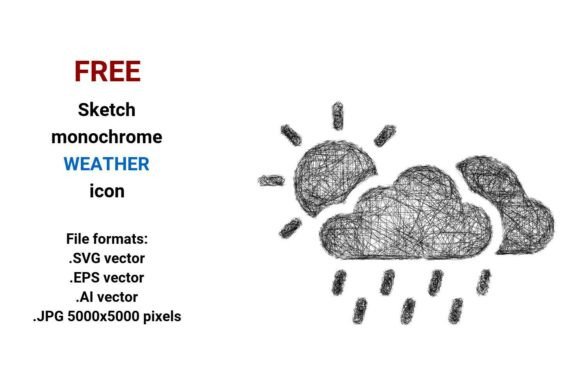
FREE Sketch Weather Icon: Hand-Drawn & Scalable
Imagine opening a weather app and seeing a soft, pencil-sketched sun—not a glossy icon, but something that feels human-made, approachable, and quietly confident. That’s the quiet power of the FREE Sketch Weather Icon collection: 4 versatile file formats (.SVG, .EPS, .AI, and high-res .JPG) designed for real-world flexibility without sacrificing artistic integrity.
This isn’t just another weather icon pack. It’s a set built for clarity *and* character—monochrome, sketch-style vector illustrations that communicate outdoor weather at a glance while leaving room for personality. Whether you’re mapping a weekend camp forecast, designing an educational infographic, or building a nature-focused mobile app, these icons bridge function and feel in ways flat, over-polished alternatives often miss.
Why Sketch Style Works for Weather & Outdoor Contexts
Weather is inherently dynamic—and so is human experience outdoors. A sketched cloud doesn’t need to be photorealistic to signal “rain ahead.” Its slight unevenness, subtle line weight variation, and hand-drawn imperfection actually reinforce authenticity. That’s especially valuable for audiences who value honesty over polish: hikers checking trail conditions, educators teaching climate literacy, or small businesses promoting local outdoor events.
Unlike rigid UI icons, sketch-style weather symbols invite interpretation without confusion. A lightly shaded thundercloud with visible pencil texture suggests “possible afternoon storms”—not alarm, but awareness. A loose, looping wind line hints at breezy afternoons rather than gale-force warnings. This tonal nuance matters when your goal is engagement, not just data delivery.
Four Formats, One Practical Workflow
The inclusion of .SVG, .EPS, .AI, and .JPG (5000×5000 px) means you’re covered across tools and outputs:
- .SVG: Ideal for websites, dashboards, and responsive apps—lightweight, scalable, and CSS-editable (e.g., change stroke color on hover for an interactive camp forecast button).
- .EPS & .AI: Native vector support for Adobe users—perfect for editing line weight, adjusting proportions, or integrating into larger branding systems (like a park service brochure or outdoor gear label).
- .JPG: High-resolution raster use—great for print materials (trailhead signage, workshop handouts), social media banners, or embedding in non-vector-friendly platforms like Canva or PowerPoint.
No conversion headaches. No quality loss when scaling from a tiny app icon to a 24” exhibition poster. Because it’s vector-based, every line stays crisp—even when zoomed 400% in a presentation slide.
Creative Uses Across Real Projects
Designers and creators aren’t limited to weather apps. Here’s how different users are putting the FREE Sketch Weather Icon to work—practically and purposefully:
- Educators use the monochrome sketch style in classroom infographics—pairing icons with student-drawn annotations to reinforce weather vocabulary (“What does this sketched fog symbol tell us about visibility?”).
- Outdoor brands layer the icons into product packaging (e.g., a sketch raindrop beside “water-resistant” on a backpack tag) to reinforce functionality with visual warmth.
- Bloggers and content creators embed SVG versions directly into WordPress posts—linking each icon to localized forecast sources, turning static weather mentions into actionable, audience-specific camp forecast tools.
- Freelancers and agencies adapt the base sketches into custom icon sets—adding consistent linework or minimal shading to match a client’s brand voice (e.g., a “casual but capable” hiking app identity).
Keeping It Clear, Consistent, and Audience-Friendly
Sketch doesn’t mean sloppy. Effective use starts with intention. If you’re building a camp forecast dashboard, maintain consistency: stick to one line weight across all icons, align them to the same baseline, and use uniform spacing. Avoid mixing sketch styles (e.g., don’t pair a heavy-pencil sun with a fine-line lightning bolt)—it fractures visual trust.
For accessibility, ensure contrast meets WCAG guidelines—especially in .JPG exports. In SVG or web use, add aria-label attributes (e.g., aria-label="Partly cloudy – mild temperatures expected") so screen readers convey meaning, not just appearance.
And remember: sketch style invites collaboration. Share the .AI or .EPS files with team members who may want to tweak proportions for a specific layout—or even redraw one icon by hand as part of a live workshop. The format supports iteration, not just deployment.
More Than Icons—A Design Mindset
The FREE Sketch Weather Icon reflects a broader shift: away from sterile uniformity and toward human-centered clarity. It’s proof that functional design doesn’t require sacrificing warmth—or versatility. You don’t need advanced illustration skills to use it well. You do need to ask: Who sees this? What action should it support? What feeling should it leave behind?
A sketch sun isn’t just “sunny.” It’s “you’ll want sunglasses—but also a light jacket.” A sketched snowflake isn’t just “cold.” It’s “pack extra layers, check trail status, enjoy the quiet.” That subtle emotional resonance is what makes these icons stick—not just in interfaces, but in memory.
Whether you’re launching a regional hiking blog, prototyping a weather-aware smart device, or designing curriculum for middle-school science, start with clarity of purpose. Then let the FREE Sketch Weather Icon do what it does best: translate outdoor weather into something legible, adaptable, and quietly human.